
Untangling Bureaucracy with RAG IM2026


It’s currently innovation month across the Australian Public Sector - as part of the festivities a challenge was set to “build a bureaucrat bot”.
I thought it apt to give the challenge a “fair shake of the sauce bottle” . It was a good excuse for me to dive into something new and untested, maybe learn a thing or two along the way. I wanted to summarise the journey - not necessarily in my usual deep dive technical style, but approachable enough to get an idea, with some relevant links to code.
If you want to poke at it yourself, the repo’s here with a live demo here and if you spot something I’ve done badly (very possible), I’d love to hear about it.
And a summary of what the bot does below (excuse my artistry.😊)
Challenge
Section titled “Challenge”Innovation month similar to a hackathon is a good way to platform and provide opportunity to showcase - dare I say it - innovation in delivering smarter outcomes in what I’m going to coin “good public service”. With the theme “Ready or not” the primary focus this year is around harnessing the capabilities of AI (in all forms) without losing sight of the goals aforementioned. The “Build a Bureaucrat Bot” event took this theme and provided a tangible category for all to participate.
“Can you build a helpful bot for a real public service problem? Use generative AI to create an interactive bot that helps public servants, senior leaders or citizens. No coding experience needed - no-code, low-code and prompt-based builds are welcome.”
In addition the bot could sit in primarily one of the below categories.
- The Chief AI Officers Aide: Tools that support strategic decision-making, adoption planning, governance, maturity assessment, prioritisation, risk framing or executive briefings
- The Workday Wingmate: Drafting, planning, summarising, navigating internal guidance, preparing meetings, improving correspondence, supporting teams, or making routine work less painful
- The Cobber Bot: Citizen-facing or public-facing ideas that make services, obligations, forms, decisions, entitlements or processes easier to understand and engage with.
- The Complexity Tamer: Tools for policy, research, modelling, simulation, evidence synthesis, system mapping, scenario testing or making trade-offs more visible
- The AI Trailblazer: Move from curiosity to responsible practice: identifying opportunities, designing experiments, working through risks, building confidence, planning implementation, or scaling what works
Approach
Section titled “Approach”The Complexity Tamer category instantly lit up for me. Untangling bureaucracy can be an art form, particularly when trying to administer and uphold laws.The immediate scenario which came to mind was navigating Law Administration Practice Statements (PS LAs).
A PS LA is an article that provides direction to Public Service workers on approaches to take when performing duties which involve the Superannuation and Tax laws being administered. Whilst the PS LAs themselves are not law or public ruling, they are used to help undertake technical direction in various matters. This “abstraction” layer above the law, certainly is in the category of taming complexity - but there were a few “bottle necks” in analysing a practice statement that I wanted to try and test.
- The abstraction of law means that the language or legal ease is still going to be present in the directions provided - how can this become more accessible to someone less technical.
- Drawing parallels between articles is currently difficult unless directly referenced in the statement itself - In some scenarios there may be multiple PS LAs covering various technical topics - “GST Rulings” can appear across three PS LAs with two of them withdrawn.
- Searching and using the PS LAs as reference is currently relegated to a public facing website with the content being in HTML/Static Web - it works, but outside of reading the PS LAs themselves you would need additional uplift to use the data in other environments.
The Idea
Section titled “The Idea”My idea was to implement a retrieval augmented generation tool (RAG) to quickly sift through PS LAs based on a user’s prompt and provide a highly tailored response to the user. I’ll try and provide a simple step by step example of a RAG assisted result.
- User prompts tool in simple language to try and gather information on making a technical decision.
- Prior to our call going to our preferred generative model we ensure that our prompt is searched against a database of information housing all of our PS LA knowledge.
- If a PS LA is found its crafted into a context payload.
- The personality of our model is heavily guarded - it can only talk about PS LAs, it is given strict instructions to use the context provided and any request outside of PS LAs is rebuffed.
- We stuff the context between our guard rails (prompt stuffing) and tell the model this is its primary subject.
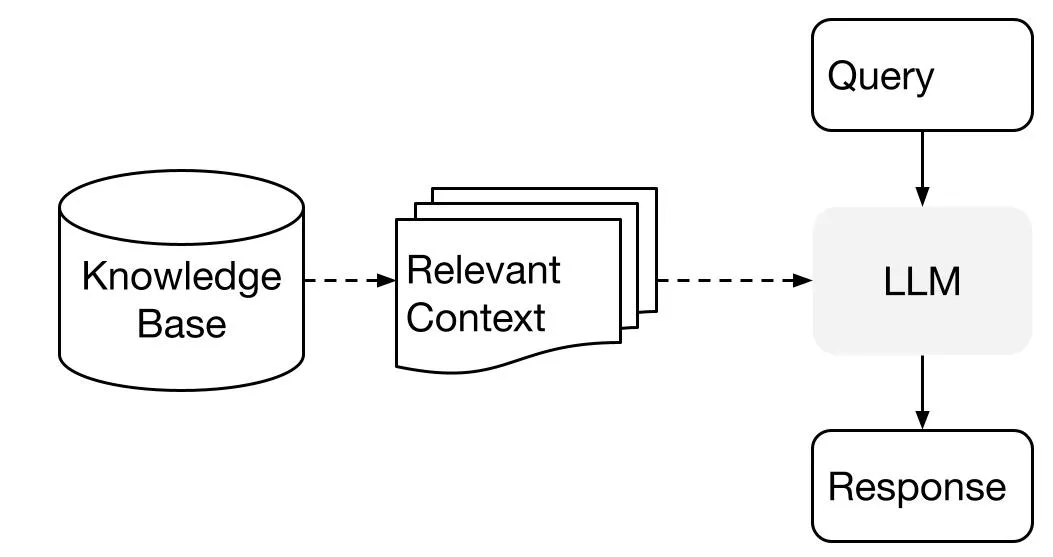
And there you have it - a retrieved piece of information has augmented our prompt and resulted in a pointed generation!
Initially, I was imagining a Saturday and Sunday at best to build, test and deploy - leaving me plenty of time to write this piece. How wrong I was (apologies for any grammar or spelling mistakes in advance 🙃).
The Plan
Section titled “The Plan”The project is broken into two repositories - the ingestion engine and the presentation layer or “front end”.
For this project to show promise it was important to fine tune both - not only were they reliant on each other but also each in its own right drastically changed the user experience outcomes.
Ensuring good data stewardship is going to dictate the success of outcomes - and to some degree this holds true for any technology program in the not too distant future. I will go through and break out both the ingestion pipeline and front end into interesting challenges and learnings, however, if you want to review the full code its open source and available on GitHub here.
Below is an outline of the initial ingestion flowing into a full stack interactive web interface.
Website with PS LA content (Public Facing Website) │ ▼ ┌───────────────────────────┐ │ Ingestion Engine Pipeline │ │ • Converts HTML to MD │ │ • Parses metadata │ │ • Sanitizes URLs/Dates │ └─────────────┬─────────────┘ │ ▼ [ knowledge.json ] (DB Artifact) │ ▼ ┌───────────────────────────┐ │ SvelteKit Backend │ │ (api/library/server.ts) │ │ │ │ ┌───────────────────┐ │ │ │ • Context Search │ │ │ │ • Filter Stops │ │ │ │ • Score Relevance│ │ │ │ • Stuff Prompt │ │ │ └─────────┬─────────┘ │ └─────────────┼─────────────┘ │ [API Payload] (Stuffed Prompt to Model) │ ▼ ┌───────────────────────────┐ │ SvelteKit Frontend │ │ │ │ ┌─────────────────────┐ │ │ │ uiState.svelte.ts │ │ (Global UI state) │ └──────────┬──────────┘ │ │ │ │ │ ┌──────────▼──────────┐ │ │ │ • Display Chats │ │ │ │ • Search DB/Context │ │ │ │ • Prompt │ │ │ │ • Detail & timeline │ │ │ └─────────────────────┘ │ └───────────────────────────┘Ingestion
Section titled “Ingestion”Ingestion has been broken down into a few parts - I want to thank whoever built and maintaned the website housing PS LAs, there are some key patterns I relied on throughout the ingestion phase and without them, I don’t think I would have finished this project in time.
Crawling
Section titled “Crawling”Each PS LA has a unique URL, lets take one as an example:
https://www.ato.gov.au/law/view/document?docid=PSR/PS19981/NAT/ATO/00001.
Removing the static parts of the URL we can review only this section:
PS{year}{sequence}/NAT/ATO/00001.
Rather then copy pasting each URL my first automation was to build a quick request resolver to go through a range of years to scan valid links within that year. If you are interested in the code you can review it here.
For each successfully resolved URL it was appended to a text document called verified_urls.txt in the /data folder.
A few things I learnt from this feature:
- Not all websites expect a friendly header to let the web administrator know what your crawler is doing (I’m assuming some Cloudflare technology trend) just rejected my requests when I had something along the lines of
Crawler-Innovation-Monthin my header. Sorry admin. - Graceful delays and timeouts help reduce gaps in the data hammering a request isn’t the most efficient way to gather and validate evidence.
- Reliable patterns make for good automation - and allow not only for an easier approach to administration but also for external parties to integrate and extend your product.
Scraping
Section titled “Scraping”I am of the firm belief that one of the top sought after skills in the next 5-10 years will be centred around the ability to write good documentation, in addition to being able to write it in markdown.
Generative models are good at this, yet when it comes to articles that are extremely nuanced or not in the public domain - it’s on us to build that layer to help get to outcomes faster.
Scraping a website isn’t ground breaking - however - translating a website from HTML markup to markdown is where it gets interesting. Thankfully the web administrators once again were gracious enough to clearly mark the PS LA webpage with easy to understand id’s tied to the various markup elements. It was on me to translate those elements into a markdown format - the python utility responsible for this can be reviewed here.
Doing this during ingestion made sense, we could have reserved it for the front end however that also complicates the prompt stuffing - LLM’s are a lot better at understanding markdown as context then they are HTML.
During this parsing stage I created a key value data structure to return which would be appended to a .json file. The return object looks like this:
return { "doc_id": doc_id, "title": title, "category": category, "raw_text_content": markdown_content, "revision_history": revision_history, }Learnings from this feature:
- Stripping elements and cleaning the ingestion data was critical - we didn’t need images, contact details or scripts. Purely the content relevant to the task
- By preserving the HTML in its markdown equivalent presenting this back in a front end was much easier to manage. i.e. a title denoted with
#was easy to render as a<h1>using a markdown parser. - Breaking up the parsed data into metadata attributes allowed us to create faster searches across documents (and expand out capability to include other sources in the future).
Persistence/Storing
Section titled “Persistence/Storing”Finally should there be no data ingested, the application will create and store the results in two files, one which houses all the valid URLs, and one which will be the main source of truth artifact to our full stack web app (knowledge.json).
I built a persistence service to check if the files existed and only run the service if they didn’t. This was primarily to rapidly test but also not recrawl URLs if I had a fully valid list and only wanted to update the database with new tags/content.
The Application
Section titled “The Application”With the ingestion engine reliably producing knowledge.json, the other half of the problem was giving that data somewhere to live that didn’t feel like reading a legal document with extra steps. I decided to go back to my tried and tested friend SvelteKit - if you are interested in my feelings about it you can read more here.
Similar to my reasonings for that project I wanted to have a quick and easy way to deliver both front and back end without splitting infrastructure and inflating cost.
The front end has two main responsibilities, I won’t go into the technical detail of the UI implementation as this post is more focussed on the “RAG” side of things however it provides the user with.
- A way to communicate to the chatbot through a common chat interface
- A way to browse all of the context available, and, prompt based on a PS LA as a starting point to a conversation.
Models
Section titled “Models”For the generative engine I did test both a local model using llama 3.1 4B and Google Gemini’s cloud model. I ended up choosing Gemini as it’s free and one less hosting problem to consider - that said the system is fully capable of slotting in and out models. Currently the hosted version is using gemini-3.1-flash-lite which I found perfect for a tech demo.
Context Search
Section titled “Context Search”Once knowledge.json existed, the job of the backend was fairly simple to state and much less simple to get right: take whatever a user typed, work out which PS LA (if any) it’s actually about, and only then let the model open its mouth. I’ll admit up front - there’s no embedding model or vector database sitting behind this thing. getContextByKeyword is doing keyword scoring, plain and simple.
Every document in the knowledge base gets a score based on a handful of signals:
- Does the raw query appear verbatim in the text (+10).
- Does it appear in the title or doc ID (+20).
- Word-by-word matches against title, doc ID and body content at smaller weights.
There’s a small bit of nuance in there for our PS LA 1998/1 style references specifically - if a query word contains a slash and matches the doc ID (think someone pasting in PS 1998/1 or similar), it gets bumped harder than a generic word match, because that’s about as close to a direct citation as a user is going to give us.
Anything that doesn’t clear a minimum match ratio (at least a quarter of the query’s meaningful words showing up somewhere relevant) or a minimum score gets discarded, and I only ever pass the top three scoring matches through to the model.
Stop words get filtered out before any of this even starts, otherwise “what does the ATO say about GST” would spend most of its scoring budget matching “the” and “about” against every document in the library. We don’t want to score these words as they are just part of common lexicon and will appear everywhere.
The /api/chat is home to this functionality, specifically context.ts doing the scoring and searching.
Learnings from this feature:
- Keyword scoring is unglamorous but it’s transparent - I can look at any result and explain in one sentence why it scored the way it did.
- The slash-matching quirk exists purely because of how PS LAs are referenced in the wild (
1998/1,2011/27, etc.) - a generic RAG implementation wouldn’t have thought to weight that, but knowing your data’s shape earns you these small wins. - Capping at three matches was a deliberate guardrail on context size as much as anything else - Gemini doesn’t need six PS LAs shoved into a system prompt to answer a question about GST rulings, and neither does the person asking it.
Prompt Stuffing
Section titled “Prompt Stuffing”The personality of the agent is fine tuned in this file. Here you can see its personality and instructions. I wrote a custom function which takes whatever came back from the context search and does one of two things.
- If nothing matched, the model gets
AGENT_INSTRUCTIONSplus aPOLICY_NOT_FOUND_GAURDRAILblock which tells it, in no uncertain terms, that it doesn’t get to freelance an answer about tax law from its own training data. - If something did match, it gets
AGENT_INSTRUCTIONSplusPOLICY_FOUND_INSTRUCTION, followed by every matched document wrapped in its own clearly delimited block - source link, doc reference number, title, and the full markdown content, separated by a run of equals signs so the model has an unambiguous way of telling one PS LA from another when more than one comes back.
This is the “prompt stuffing” I mentioned earlier made real - the model’s personality and its subject matter are being assembled fresh on every single request, out of instructions I control and content that’s been vetted by the scoring step above.
Learnings from this feature:
- Separating “found” and “not found” instructions turned out to matter more than I expected. Early on I was using one instruction set and telling the model to “use context if provided” - it would occasionally still have a go at answering from general knowledge when nothing matched. Splitting the guardrail language into its own explicit branch closed that gap.
- Labelling each context block with a document reference number (
#1,#2,#3) rather than just dumping raw text back to back gave the model something concrete to cite back to the user, which matters a lot when someone’s asking about a topic that spans a withdrawn PS LA and its replacement.
Model Calls
Section titled “Model Calls”+server.ts is the thin layer that actually talks to Gemini - and deliberately thin. It pulls the API key, validates the incoming message array, pulls the last user message out as the query, and hands it to getContextByKeyword. From there it’s mostly plumbing: build the system instruction, reshape the conversation history into the user/model roles Gemini expects (SvelteKit and the frontend are happy calling it “assistant”, Gemini is not), and open a streaming connection with generateContentStream.
The response comes back chunk by chunk through a ReadableStream, which gets piped straight to the client as plain text rather than waiting for the full generation to finish - useful for anything constrained to an edge runtime, and it’s the difference between a user staring at a blank screen for a few seconds versus watching an answer arrive. One small addition I was glad I made early: an x-context-retrieved header on the response, set to whether any PS LA actually matched. It’s a cheap way for the frontend to know, before it’s even parsed a word of the streamed answer, whether it’s looking at a grounded response or a guardrail refusal.
Library Endpoint
Section titled “Library Endpoint”Sitting alongside all of this is /api/library, a much simpler read-only endpoint that just flattens the entire knowledge base into an array - id, title, category, content, source URL and revision history per document. This is what lets the frontend browse the full PS LA library independently of any chat interaction, which turned out to matter once I started thinking about the “detail & timeline” view - being able to look at a PS LAs revision history directly, without needing to have asked the chatbot a question first.
Wrapping Up
Section titled “Wrapping Up”I thought a “Saturday and Sunday” session would be all it took, here we are finishing this piece 2 days before the deadline, which is probably the most honest lesson from Innovation Month: taming complexity is itself complex.
If you want to poke at it yourself, the repo’s here with a live demo here and if you spot something I’ve done badly (very possible, see grammar disclaimer above), I’d love to hear about it.